
How to Use Instagram's New Repost Feature
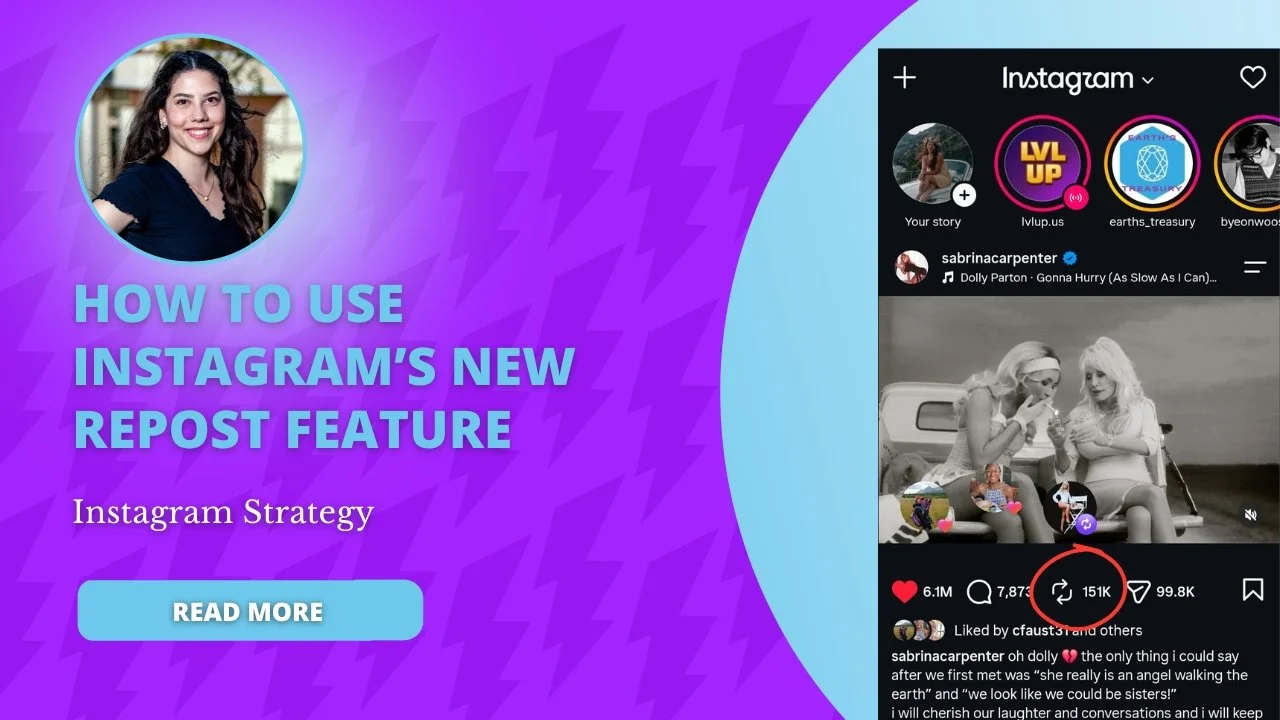
Instagram now lets you reshare someone else's post or Reel straight to your followers' feeds with a single tap. If you run a business account and you've been relying on screenshots, third party apps, or Story shares to amplify customer content, that workflow is outdated. Here's how the native repost function works, what to repost, and how to fold it into a content strategy that actually builds trust.
Key Takeaways
Instagram's new repost feature for feed posts and Reels launched globally in late 2025, letting Instagram users reshare public content natively with automatic credit to the original creator.
Businesses can now turn happy customer content, client shoutouts, and partner posts into social proof directly in their Instagram feed without third party tools.
A healthy mix of original Instagram content and thoughtful Instagram reposts helps brands reach new audiences, stay consistent, and build trust. User-generated content is more trusted than branded content, making reposts a credible addition to any feed.
This guide covers how to use the Instagram repost feature step-by-step, what to repost, how often to repost, and how to stay compliant and respectful of creators.
What Is Instagram's New Repost Feature (and How It Works)
Instagram reposts let you reshare another account's feed post or Reel directly to your own followers, not just to an Instagram Story that disappears in 24 hours. Think of it as Instagram's version of a retweet or a TikTok repost.
Meta announced this brand new feature on August 6, 2025, and it is now standard in the Instagram app on iOS and Android for any public account. Private accounts cannot have their content reposted through this feature; only public posts and public Reels are eligible.
When you repost content, it lives in two places. First, it appears in a dedicated repost tab on your profile, separate from your curated main grid. Second, Instagram may surface it in your followers feeds based on its recommendation algorithm. Your own profile feed stays clean because reposts don't mix into your grid of original content.
Attribution is automatic. Viewers see the original creator's username, profile picture, and a tappable link back to the original Instagram post. Instagram's repost feature automatically credits the original creator, which helps maintain traffic to the person who made the content in the first place. This is different from third party repost apps or manual screenshots, which risk broken attribution, lower resolution, and possible policy violations.
Quick Start: How to Repost on Instagram in a Few Taps
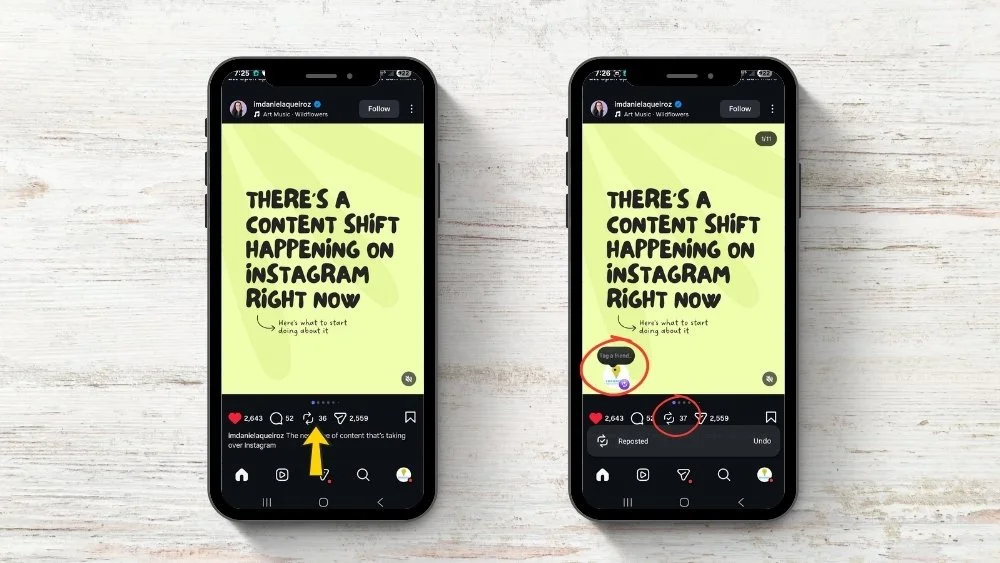
If you just want to know how to repost on Instagram, here are the steps:
Open the Instagram app and find a public feed post or Reel you want to share.
Tap the repost icon (two looping arrows) beneath the content. On some accounts, it sits near the paper airplane icon used for direct messages.
Optionally add a short note via the thought-bubble overlay. This is where you add your own caption or context for your audience.
Confirm the repost. The reposted content now appears in the reposts section on your profile, and your followers may see it in their Instagram feed.
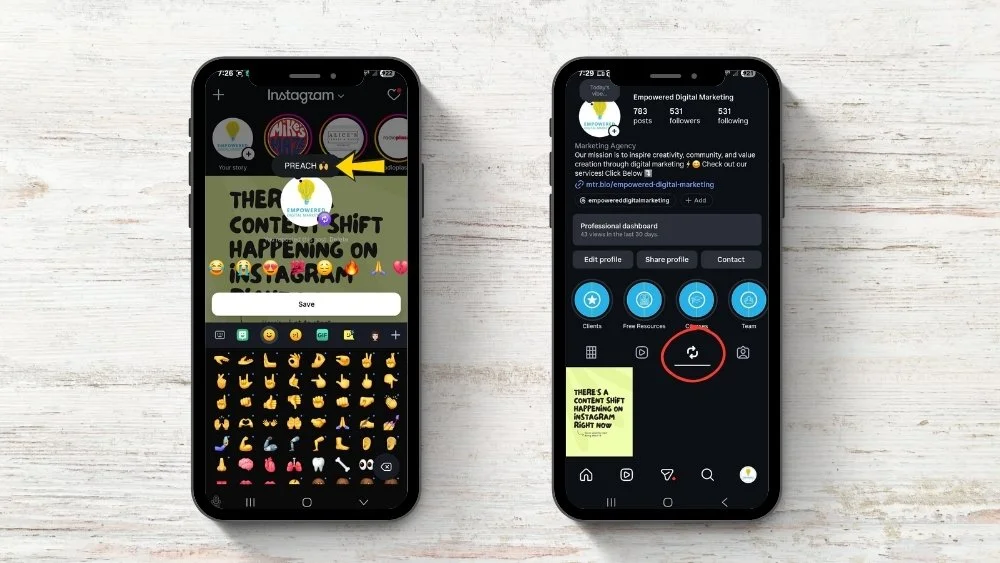
To undo a repost, tap the same icon on the post or go to the repost tab on your profile and remove it from there. Removing a repost does not affect the original post; it only removes the reshare from your account.
A few things to keep in mind:
You cannot alter the content when reposting. Never alter the content in misleading ways; Instagram locks the media as-is. Use Instagram's built-in sharing features for reposting whenever possible.
The repost button works on mobile. Desktop and web browser support is inconsistent; many users report the feature is unavailable there.
If you're new to this, test your first repost using a low-risk piece of partner or collaborator content. Repost a reel or post from a business you already work with, add a note explaining why it's relevant, and tap repost.
How to Repost Different Types of Instagram Content
The Instagram repost feature supports several content formats: single-image feed posts, carousels, and Reels.
Single-image feed posts are the simplest format to repost. A post appears in the repost tab with the original poster's attribution intact. This format works well for testimonials, tagged photos from clients, or simple product shots. If a customer posts a photo celebrating a milestone and tags your business, that post is a strong candidate for a repost.
Carousels keep all slides when reposted. That makes them ideal for step-by-step guides, client stories, or educational explainers. If a partner account publishes a carousel about, say, five questions to ask before choosing a benefits plan, reposting it brings that value to your audience without recreating the content.
Reels follow the same repost flow. Tap the repost icon beneath any public Reel, add a note, and confirm. If you want to create a side-by-side response or add your own footage, use Remix or Collab instead; those tools produce new content rather than resharing an existing reel directly.
Older manual options like screenshots, your phone's screen recording feature, or third party apps are now fallbacks for edge cases only. The native repost button is cleaner and safer. Instagram now flags accounts that post "unoriginal" photos (images reuploaded via screenshots or third-party methods) and reduces their reach. Instagram prioritizes original content and penalizes unoriginal posts, so content shared outside the native feature gets shown only to existing followers, not recommended to new audiences.
Why Instagram Reposts Matter for Businesses (Not Just Creators)
Brands, local businesses, and professional services benefit from Instagram reposts in ways individual creators often don't need. The core reason is the gap between polished branded content ("trust us") and authentic customer content ("trust them").
Reposting builds trust through authentic customer content. A 2025 report found that 47% of consumers say they like it when brands repost user generated content. That preference makes sense: reposting showcases real customer experiences, enhancing authenticity in a way that stock photos or scripted testimonials cannot. User-generated content increases brand credibility because it comes from real people with no incentive to exaggerate.
Reposting can expand organic reach by connecting to the original creator's audiences. When you repost someone else's content, Instagram may recommend it to your followers, even if they don't follow the original account. That means reposting can expand your organic reach on Instagram beyond your existing follower base. Reposting can improve brand visibility and engagement without requiring your team to produce a new post from scratch.
Here's a concrete example. The Northampton Jazz Festival could repost Reels of artists who will be performing as part of their lineup. Before the festival, the organizers don't have their own footage of those artists on stage. By reposting a public Reel from a jazz musician's account and adding a note like "Catch this set Friday at 7 PM," the festival exposes its audience to the artist's work, and the artist's followers discover the festival. Both accounts gain visibility.

Reposting also fills content gaps for lean teams. Small businesses that can't produce daily original content can repost a client win or partner announcement to stay visible on the platform without burning out their in-house team. Reposting can extend the life of high-quality content that already proved itself on someone else's account.
What to Repost as a Business on Instagram
Not all content makes a good feed repost. Curate carefully to protect your positioning and keep your brand voice intact.
High-value repost categories include:
Customer content (UGC): Photos or Reels from clients using your product or service. A tagged photo from a happy customer carries more weight than a branded graphic.
Client testimonials: A new post from a client praising your work is repost-ready, especially if it's a public account with sharing enabled.
Partner or vendor posts: Content from referral partners, HR consultants, wellness providers, or other post types that align with your audience.
Event coverage: Community events, trade shows, or local meetups where your brand participated.
Press features: Media mentions or interviews that validate your expertise.
Industry education: Relevant tips, how-tos, or explainers from other creators whose content complements yours.
Local and service businesses can repost content from associated profiles when it aligns with their audience. A health insurance brokerage, for instance, could repost a wellness provider's tips on preventive care or a dental office's oral health Reel.
Always credit the original creator when reposting content. The native feature handles this automatically. And remember, credit alone does not give permission to repost copyrighted content beyond Instagram's organic sharing, so keep that distinction in mind for any off-platform use.
Reposts should be treated as connective tissue, not the main content. Avoid reposting off-brand memes, polarizing topics, or unrelated viral videos that confuse followers or dilute your message.
How To Add Reposts To Your Strategy And How It Helps You
A practical repost workflow takes about 30 to 45 minutes per week. Here's how we approach it at Empowered Social Media when building repost strategies for clients.
Step 1: Scan for repostable content. Check brand mentions, tagged photos, and your branded hashtag weekly. Look at what other Instagram users are posting about your business or your industry. Save promising posts to a "Repost" collection inside Instagram for easy retrieval.
Step 2: Filter for quality and fit. Not everything tagged deserves a repost. Ask: does this align with our brand voice? Is the image or video clear and well-made? Will our audience care? Reject anything from private accounts or anything that feels off-brand.
Step 3: Get permission for beyond Instagram. Request explicit permission before reposting images, videos, or other content you plan to use beyond organic sharing. Always respect takedown requests from original creators. Avoid reposting from private accounts without permission.
Step 4: Repost with context. Add a sentence explaining why the content matters to your followers. A repost with a clear "why" feels curated.
A 70/30 content ratio of original to reposted content is a good starting point. That means roughly 70% of what you publish should be your own content (educational posts, behind-the-scenes, thought leadership), and 30% can be curated reposts. A 70/30 content ratio keeps your feed authentic while still benefiting from social proof. Adjust based on how much quality UGC you receive; if your pipeline is strong, 60/40 can work. If it's thin, stay closer to 80/20.
Watch out for these pitfalls:
Over-reposting dulls your brand's own voice. If all you do is repost, your unique perspective fades, which weakens long-term loyalty.
Reposting irrelevant trending content for reach often backfires if it feels disconnected from your business.
Use a branded hashtag to imply permission for reposting (e.g., "By tagging #YourBrandName, you agree we may reshare with credit").
Consistent reposting of customer content encourages more clients to tag your account in their own posts. This starts a flywheel: more tags lead to more reposts, which lead to more engagement, which leads to more tags. Reshares of partners, referral sources, or local community organizations also lead to cross-promotion and audience overlap, expanding your reach without ad spend.
How to Encourage More Reposts of Your Own Content
The repost feature works both ways. You want other people to repost your content too, because every repost puts your brand in front of new audiences.
Use clear CTAs. Add lines like "Tap the repost icon to share this with your team" or "Share this to your own story if it helped" in your captions. Everyday users often don't think to repost unless prompted.
Create content worth sharing. Branded templates and educational carousels that teach something specific (a checklist, a comparison, a how-to) naturally invite reposting for value. People repost content that makes them look helpful or informed to their own followers.
Build a branded hashtag. Add simple instructions in your bio, email signature, or print materials encouraging clients to tag your account when they share their experience. A dedicated hashtag makes it easy to find and curate customer content for your feed.
Run occasional feature series. A weekly "Client Spotlight" or monthly roundup of the best posts using your hashtag gives people a reason to participate. Small giveaways or shoutouts for people whose posts get reposted reinforce the behavior without resorting to spammy tactics. Highlight that their reel or post might appear on your profile, which adds a layer of recognition.
FAQ: Instagram Reposting for Brands
How often should my business use the Instagram repost feature?
Frequency should be driven by the quality of available customer content and audience response, not by hitting an arbitrary repost quota. If you have three strong client posts in a week, repost all three. If nothing fits your brand, skip the week. A 70/30 content ratio of original to reposted content is recommended as a baseline, just to show Instagram that you are still an active account and are utilizing their new features.
Can I repost Instagram content into paid ads or on my website?
The built-in Instagram repost feature only covers organic sharing inside Instagram. It does not automatically give rights for ads, email campaigns, or website usage. Obtaining explicit written permission (via DM or email) before turning any user-generated content into an ad, case study, or landing-page asset is required. The native tool gives proper credit on Instagram, but that credit does not extend legal permission for commercial use outside the platform.
What if a customer asks me to remove a repost of their content?
Remove it promptly. You can delete the repost through the repost tab without affecting the creator's original Instagram post. Even if you originally had permission, honoring a removal request protects the relationship and your reputation.
Does using more reposts hurt my reach or the performance of my original content?
Balanced, relevant reposting generally helps reach by surfacing high-engagement customer content to new audiences. Issues arise mainly when your unique brand perspective fades because all you are doing is reposting, which can weaken long-term loyalty. Treat reposts as a complement to, not a replacement for, original educational, behind-the-scenes, and thought-leadership content.
Can I repost content from a private account?
No. Instagram's native repost function only works with public posts and public Reels. Content from private accounts is not eligible. Even outside the native tool, reposting from private accounts is poor etiquette and risks violating the creator's privacy expectations. If you want to share something from a private account, reach out to the account owner and ask them to either make the specific post public or create a new post on their public account that you can then add to your feed.
Start Reposting on Instagram Today
Instagram reposts are a low-friction way to fill your feed with authentic content while giving proper credit to the people who created it. Start with one or two reposts per week, track what resonates, and build from there.
If you want help building a repost workflow that fits your brand, from sourcing customer content to writing captions that maintain your voice, Empowered Social Media can design a strategy tailored to your business.