
Getting your YouTube Shorts dimensions wrong means your content gets cropped, buried, or ignored entirely. In a format where first impressions happen in under two seconds, technical mistakes with resolution and aspect ratio can sink even the best creative ideas. This guide covers everything you need to know about sizing, formatting, and optimizing your Shorts for 2026-from exact pixel specs to safe zones, cross-platform exports, and the common errors that silently kill engagement.
Key Takeaways
The standard YouTube Shorts size in 2026 is 1080 x 1920 pixels in a vertical 9:16 aspect ratio, where width (1080) always comes first in the notation.
YouTube Shorts can be up to 3 minutes long as of October 15, 2024, but most high-performing short videos stay between 15 and 45 seconds for stronger audience engagement.
The 9:16 aspect ratio is the best aspect ratio for Shorts because it fills mobile devices edge-to-edge, matches other short form video platforms like TikTok and Instagram Reels, and avoids black bars entirely.
The same vertical 1080 x 1920 export works across other platforms, but safe zones and UI overlays differ slightly between YouTube, TikTok, and Instagram Reels.
Empowered Social Media recommends always planning and shooting in vertical 9:16 rather than cropping long video later to preserve quality and composition.
What Are YouTube Shorts Dimensions in 2026?
When creators talk about YouTube Shorts dimensions, they mean two things: the pixel resolution (how many pixels wide and tall your video is) and the aspect ratio (the proportional relationship between width and height). Together, these determine whether your video fills a phone screen, gets pushed into the Shorts feed, or ends up as a regular YouTube video with an awkward frame.
The recommended resolution for YouTube Shorts is 1080 pixels wide by 1920 pixels tall, giving you a 9:16 aspect ratio. This is verified against current 2026 YouTube specs and delivers full HD vertical quality on modern smartphones.
YouTube still supports lower vertical resolutions like 720 x 1280, which is the minimum resolution for YouTube Shorts. However, videos below 720 x 1280 resolution may appear pixelated on today's high-resolution mobile screens-especially on flagship phones with displays well beyond 1080p.
Here is a quick comparison to clarify orientation:
1080 x 1920 (9:16): Vertical. Fills a phone screen held upright. Classified as a Short.
1920 x 1080 (16:9): Horizontal. Standard landscape format. Classified as a regular YouTube video.
YouTube will technically accept different video aspect ratios, but only vertical or square formats are treated as Shorts and shown in the Shorts feed. Horizontal videos, regardless of length, are classified as regular YouTube videos.
Understanding Aspect Ratio (and Why 9:16 Wins for Shorts)
An aspect ratio is simply the relationship between a video's width and height, expressed as two numbers separated by a colon-like 16:9, 9:16, or 1:1. It tells you the shape of your video frame before you even think about pixel count.
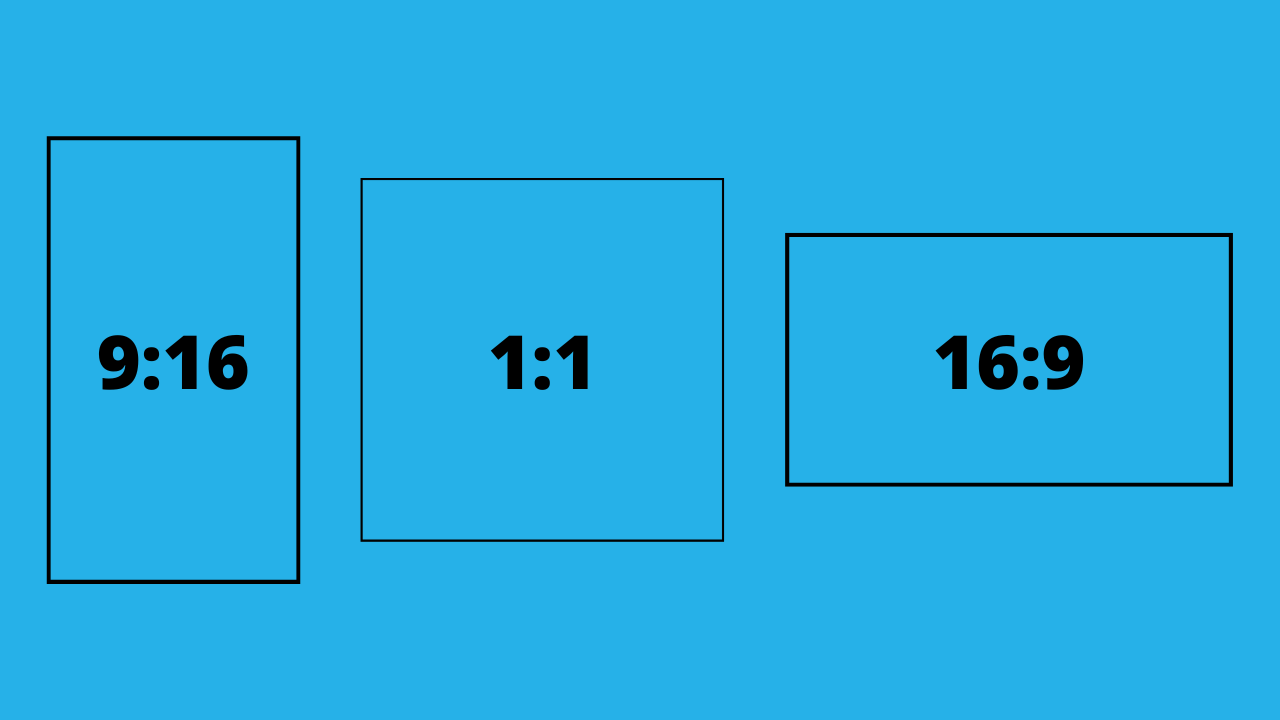
Here is how the most common ratios break down in practice:
16:9 is the standard for TV, computer monitors, and long form video on YouTube. The ideal aspect ratio for standard YouTube videos is 16:9.
9:16 is standard for mobile-first short form video-YouTube Shorts, TikTok, and Instagram Reels all default to this format.
1:1 is a square format, historically popular on Instagram's grid.
The 9:16 aspect ratio is literally the vertical flip of 16:9, making it a natural fit for phones held upright. This is why it has become the default across short form video platforms including YouTube Shorts, TikTok and Instagram Reels, Facebook Reels, and Snapchat Spotlight.
While YouTube accepts other aspect ratios, 9:16 remains the best aspect ratio for YouTube Shorts if your goal is maximum reach and audience engagement. Using 9:16 improves engagement and algorithm performance because it signals to YouTube's algorithm that your content is designed for the Shorts experience.
The Official YouTube Shorts Requirements: Size, Length, and Format
This section serves as your quick-reference checklist. Here are the core specs for YouTube Shorts videos in 2026:
Resolution: 1080 x 1920 pixels (recommended). The recommended resolution for YouTube Shorts is 1080x1920 pixels.
Aspect ratio: 9:16 (vertical). YouTube Shorts require a 9:16 aspect ratio for optimal display.
File format: YouTube recommends using the MP4 file format for Shorts. YouTube Shorts should be in MP4 format.
Video codec: H.264 (High Profile). YouTube Shorts can be downloaded as MP4 with H.264 video codec.
Audio codec: AAC audio, stereo preferred, at 48 kHz sample rate.
Frame rate: 30 fps or 60 fps are both accepted. Smoother 60 fps can feel more native to mobile devices for action-heavy or fast-motion content.
Maximum length: Up to 3 minutes for vertical or square videos uploaded on or after October 15, 2024. Before that date, YouTube Shorts had a maximum duration of 60 seconds.
Shorter short videos often perform better despite the expanded limit. Videos must be vertical or square to qualify as Shorts. Horizontal 16:9 videos-even if under 60 seconds-are classified as regular long video on YouTube and will not appear in the Shorts feed. Standard YouTube videos can have no strict upper limit on duration, but Shorts have a hard ceiling at 3 minutes.
9:16 vs Other Aspect Ratios on YouTube Shorts
Creators often experiment with a different aspect ratio-square, 4:5, or even horizontal-when repurposing content. Understanding the tradeoffs is important before you upload YouTube Shorts.
Vertical 9:16 is the default that fills the entire mobile screen, eliminates black bars, and gets the strongest Shorts shelf treatment. A 9:16 video fills the entire mobile screen without black bars. Videos not in 9:16 may not appear in the Shorts feed.
Square 1:1 is accepted as Shorts. YouTube supports square video formats for Shorts, and square videos up to 3 minutes qualify. However, square videos display with visible black bars above and below on most mobile phones, reducing the immersive feel. Use the square format only when repurposing older content where re-editing is not practical.
4:5 (portrait but not full-screen) is taller than square but shorter than 9:16. It technically qualifies as vertical content, but it may appear with thin bars or slight cropping, reducing the immersive effect compared to full 9:16 vertical shorts.
Wider aspect ratios (16:9, 4:3) are treated as regular YouTube videos. These horizontal videos are not pushed in the Shorts feed and YouTube shorts should avoid black bars by filling the vertical screen. Uploading horizontal formats as Shorts can hurt short form performance significantly.
Why YouTube Shorts Use a 9:16 Aspect Ratio on Mobile Devices
Over 70% of YouTube watch time comes from mobile devices. Shorts are primarily viewed on mobile devices, which makes vertical video formats essential for mobile optimization in 2026.
The 9:16 YouTube Shorts aspect ratio matches the physical shape of modern smartphone screens. When a viewer holds their phone upright-which is how most people naturally use their device-a 9:16 vertical video covers the entire screen without any cropping or letterboxing. This full screen viewing experience keeps attention locked in.
User behavior reinforces this: people expect vertical short form video in mobile apps and are unlikely to rotate their phone for a single Short. This means horizontal videos create friction that vertical videos avoid entirely.
The connection between the correct aspect ratio and audience engagement is direct. Full-screen vertical video typically increases watch time, completion rate, and resistance to swiping away. Mobile viewing in portrait mode is the default behavior, and 9:16 works with that habit rather than against it.
YouTube's interface for Shorts is built around the 9:16 frame: the subscribe button and action buttons (like, comment, share) stack vertically on the right side, while channel name and audio info sit near the bottom. This UI design assumes vertical orientation and reinforces 9:16 as the standard for mobile viewers.
YouTube Shorts Safe Zones: Keeping Text and Faces Visible
A safe zone is the central area of the frame where important content won't be covered by UI elements like buttons, titles, or the channel name. Getting this wrong means your on screen text or call-to-action disappears behind YouTube's overlay.
Here is the Shorts interface layout in 2026: channel name and audio attribution sit near the bottom-left, caption and the subscribe button line up along the bottom, and like/comment/share/remix buttons stack on the right edge. The top of the frame can be partially covered by the status bar and search icon.
Practical guidance for a 1080 x 1920 frame:
Top: Avoid the top ~180 pixels for critical content
Bottom: Keep faces, logos, and text out of the bottom ~15–20% (roughly 290–380 pixels)
Right edge: Stay ~170 pixels away from the right side
Left edge: Safest margin, only ~40–60 pixels are blocked
Keep important content in the central safe area of the frame. Keep important content away from the top and bottom edges in Shorts to avoid UI interference. When repurposing for other platforms like TikTok Instagram Reels, safe zones shift slightly, so design all text and important visuals inside a central vertical strip for cross-platform safety.
Empowered Social Media typically designs captions and on screen text to sit just above the centerline-this keeps everything clear of overlays on most short form video platforms.
How to Shoot YouTube Shorts in the Correct 9:16 Dimensions
The easiest way to avoid dimension problems is to capture your video in the correct aspect ratio from the start. Here are practical tips so your video editor never has to "fix" anything in post.
Smartphone (the simplest method): Open your camera in portrait mode and record. Modern phones naturally capture at 9:16-often at 1080 x 1920 pixels or higher by default. This gives you HD vertical footage that is ready for the YouTube app without any resizing.
DSLR or mirrorless cameras: Rotate the camera body 90 degrees so the sensor captures a vertical frame. Use L-brackets or vertical cages for stability, and set your video project canvas to 9:16 from the start in your video editing software.
What to avoid: Do not plan to crop a horizontal 16:9 frame into vertical orientation later. This cuts off important composition and reduces resolution significantly. Traditional filming techniques in landscape simply don't translate well to vertical content without sacrificing quality.
Simple gear upgrades: Small tripods, phone clamps, and gimbals make vertical filming smoother and more professional-looking. These accessories cost far less than reshooting content that was captured in the wrong format.
Resizing Long Video into 9:16 Shorts Without Ruining Quality
Many creators have existing long form video in 16:9 and want to turn clips into short videos for the Shorts shelf and other platforms. It is possible, but the process requires intentional reframing rather than lazy cropping.
The basic workflow:
Identify a strong moment from the long video-a hook, powerful visual, or key insight
Create a new 1080 x 1920 vertical sequence in your video editor
Place the landscape footage inside the taller canvas and reframe so the main subject stays centered
Recommended tools with vertical presets or dedicated 9:16 settings include CapCut, Adobe Premiere Pro, Final Cut Pro, DaVinci Resolve, and mobile apps like InShot and VN. Any competent video editing software will let you set a custom canvas size for your video project.
Instead of simply cropping the center, move the 16:9 footage within the 9:16 frame so that faces, gestures, and text stay visible. If the original was shot in 4K, you have more room to zoom and reframe without noticeable quality loss.
When necessary, add blurred or stylized backgrounds to fill the 9:16 frame behind the cropped content. This looks cleaner than black bars and keeps the final video feeling intentional. Shorts can be uploaded in resolutions up to 4K, giving you headroom when working from high-resolution source material.
Cross-Posting: Using One 9:16 Export Across Short Form Video Platforms
One correctly formatted 1080 x 1920 vertical file works across YouTube Shorts, TikTok, Instagram Reels, Facebook Reels, and Snapchat. This is one of the biggest advantages of committing to the 9:16 aspect ratio as your primary video creation format.
Using a consistent same aspect ratio master file saves editing time, simplifies workflows, and helps maintain coherent branding across social media platforms. You create content once and distribute everywhere.
That said, subtle differences exist on other platforms. UI overlays, caption placement, and safe zones vary-Instagram Reels may position action buttons differently than the YouTube mobile app, and TikTok's text area sits in a slightly different spot. These differences matter when placing titles, captions, and call-to-action text.
The safest approach: keep the video's title, add captions, and CTAs in the center region so they remain visible everywhere despite different UI layouts. Empowered Social Media typically creates platform-specific versions only when a campaign demands custom overlays. Otherwise, a single 9:16 master export handles everything from suggested videos on YouTube to feeds on other platforms.
Optimizing YouTube Shorts Dimensions for Better Audience Engagement
Correct dimensions are the baseline. What you put inside those 1080 x 1920 pixels determines whether people watch or swipe away.
Fill the frame intentionally. A clear subject, bold text, and high-contrast colors help Shorts stand out when users quickly scroll on mobile devices. Empty space or cluttered backgrounds work against you in the Shorts feed.
Match length to content type within the allowed 3 minutes:
15–30 seconds: Entertainment, reactions, memes. Shorts perform best in the 15–30 second range for this category.
30–60 seconds: Tips, tutorials, product showcases
60–90 seconds: Complex how-tos or narrative content that needs breathing room
Keep key actions or hooks in the top half of the frame so they are visible even if viewers hold the phone farther away or watch in bright outdoor conditions. Leverage trending sounds when they complement your message-audio drives discovery across the YouTube app and other platforms.
Small dimension details matter more than most creators realize. Font size should be large enough to read at arm's length on mobile phones. Margins should respect safe zones. Eye catching thumbnails (you can set a custom thumbnail on verified accounts) draw clicks from the Shorts shelf. These refinements improve completion rates and watch time, which feeds directly into YouTube's algorithm for recommending your content.
Common Mistakes with YouTube Shorts Dimensions (and How to Fix Them)
Many creators struggle with technical setup when shifting from long video to vertical Shorts. Here are the most common errors and their fixes.
Uploading 16:9 landscape clips as Shorts. This results in a tiny strip of video surrounded by massive black bars on mobile screens. Horizontal videos will not be classified as Shorts regardless of length. Fix: Reset your video project to 9:16 in your editor and re-export at 1080 x 1920.
Incorrect orientation (1920 x 1080 instead of 1080 x 1920). If width exceeds height, YouTube treats it as a regular YouTube video. Videos uploaded with the wrong orientation miss the Shorts feed entirely. Fix: Double-check your export settings-width should be 1080, height should be 1920 pixels.
Cramming tiny text into corners. Small text near the bottom or right edge gets covered by UI overlays and becomes unreadable on smaller mobile devices. Fix: Enlarge and center all on screen text, keeping it within the safe zone. Use a font size that reads clearly at arm's length.
Baking in black bars inside the file. Some creators add padding to force a certain look. This wastes resolution and looks unprofessional. Fix: Let your video fill the full 9:16 canvas and let YouTube handle any necessary adjustments.
Not testing before publishing. Fix: Always test-play your final video on an actual phone before you upload shorts through YouTube Studio. What looks fine on a desktop timeline can surprise you on mobile.
How Empowered Social Media Approaches YouTube Shorts Strategy
Empowered Social Media helps creators and businesses build sustainable growth on YouTube using both long and short form video. Our approach starts with vertical-first thinking-we plan hooks, scripts, and visual compositions for the 9:16 frame before a single second of footage is captured.
Our typical workflow: plan the hook and script for vertical orientation, shoot vertical-first using smartphones or vertically-mounted cameras, then repurpose into Shorts and other vertical formats for cross-posting. We do not treat Shorts as an afterthought clipped from regular YouTube videos.
We prioritize 1080 x 1920 9:16 files to align with YouTube's recommended dimensions, then adjust framing for each platform's safe zones as needed. We also analyze YouTube Analytics to see how different layout choices affect watch time, retention curves, and audience engagement-because vertical videos perform differently depending on pacing, text placement, and hook timing.
If you want to create shorts that consistently reach new audiences and drive channel growth, explore more resources and services at Empowered Social Media.
FAQ: YouTube Shorts Dimensions and Aspect Ratios
Do YouTube Shorts have to be exactly 1080 x 1920 pixels?
No. The 1080 x 1920 resolution is the recommended Full HD size, but YouTube accepts other vertical resolutions as long as the aspect ratio is close to 9:16. The minimum resolution for YouTube Shorts is 720 x 1280 pixels-anything below that may appear pixelated. Higher resolutions like 4K vertical (2160 x 3840) are allowed but typically get downscaled, offering little visible benefit while increasing upload and editing time. Stick with 1080 x 1920 for the best balance of quality and file size.
Can I upload square (1:1) videos as YouTube Shorts in 2026?
Yes. Square videos up to 3 minutes can still be classified as Shorts. However, 1:1 content displays with black bars above and below on most mobile screens, so it does not take full advantage of the available screen space. Use the square format only when repurposing older content, and prefer 9:16 for new Shorts to maximize engagement and fill the entire screen.
What happens if I upload a vertical video longer than 3 minutes?
Videos longer than 3 minutes won't qualify as Shorts, regardless of aspect ratio. They are treated as regular YouTube videos and appear in the standard video player instead of the Shorts feed. This affects discovery since the Shorts feed operates differently from suggested videos in the main YouTube experience. If you have long vertical content, split it into multiple short videos to keep it within the Shorts ecosystem.
Is 9:16 still the best aspect ratio if I mainly care about other platforms?
Yes. The 9:16 aspect ratio remains the universal standard for short form video platforms like TikTok, Instagram Reels, Facebook Reels, and Snapchat in 2026. Publishing in 9:16 makes it straightforward to cross-post one clip everywhere, reducing editing time while maintaining consistent branding. Adjust only minor layout details per platform-like text positioning-rather than changing the underlying aspect ratio.
How can I check if my YouTube Short is using the right aspect ratio before posting?
Open your exported file on a phone and confirm that it fills the screen vertically without black bars on the sides. You can also check file properties in your video editor or your operating system's file info panel to verify the resolution reads 1080 x 1920 (or another 9:16 resolution). If YouTube does not categorize your upload as a Short automatically after you upload it through the YouTube app or YouTube Studio, the video may be too long, horizontal, or using the wrong aspect ratio. An AI tool or safe zone checker can also help verify framing before you publish.